Elephant Tech

Make AI design like Apple.

Tell Claude to make your website look premium and it has no idea what you mean, so it guesses. This free skill hands it the rule book underneath Apple’s design, and it can fix the site you already have.

npx skills add emilkowalski/skills --skill apple-design

✓ apple-design installed

SKILL.mdapple-design · 290 lines
name: apple-designdescription: Apple's approach to interface  design and fluid, physical motion,  translated for the web.

What’s inside

Answer the fingerMove like a springTighten big typeGlass shows depthEight principles

From Apple’s WWDC design talks · by Emil Kowalski · free, MIT

Why “make it premium” never works

“Premium” isn’t an instruction. It’s a feeling, and Claude can’t see your screen the way you do. So it guesses: a gradient here, bigger buttons there, a fancier font. An hour later the page looks different, but not better, and you can’t say what’s wrong either.

Apple’s designs feel expensive because of rules: how fast a button answers your finger, how letters tighten as they grow, how much space sits around each thing. The skill gives Claude those rules, so it stops guessing and starts checking.

Same photos, different rules

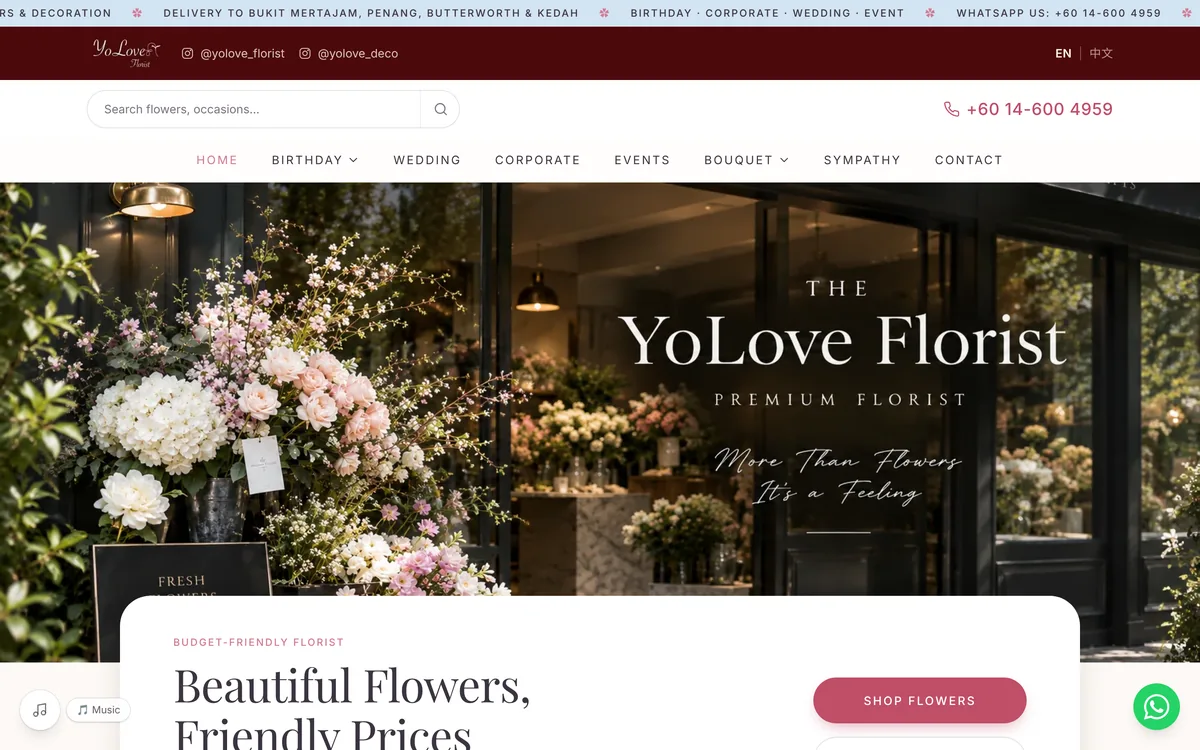
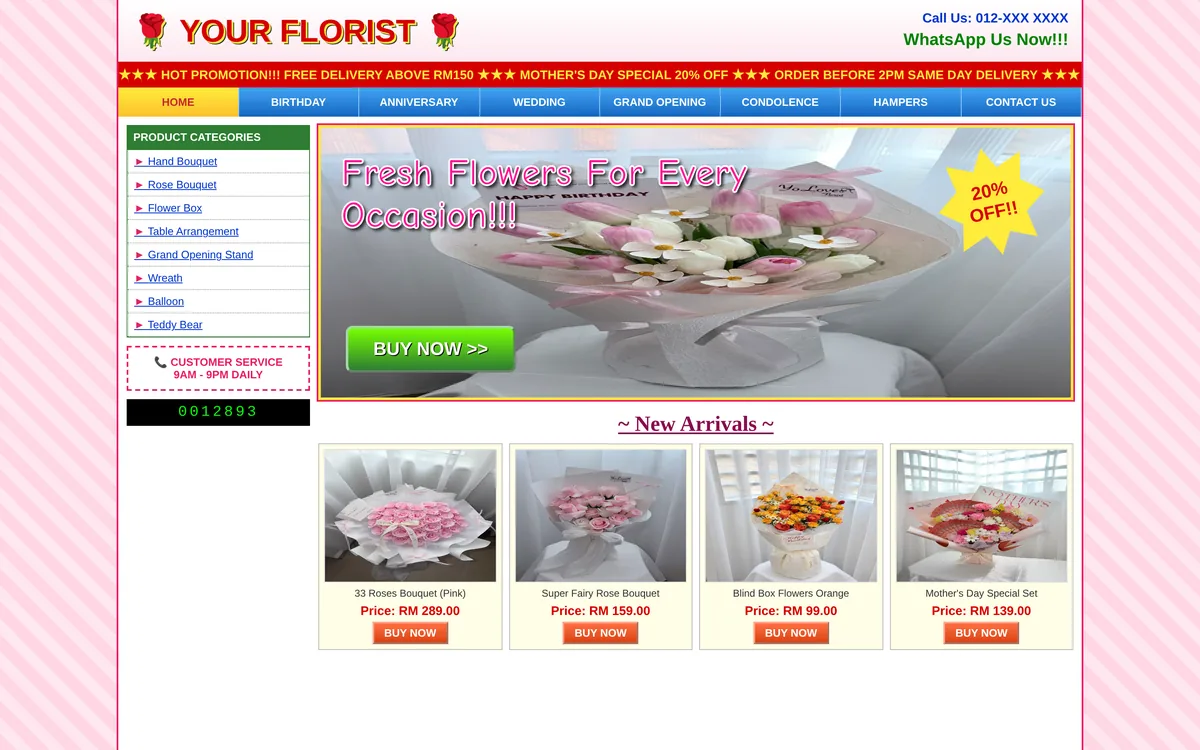
Two sites we built, beside the way most sites in the same business are built. The photos are the same on both sides, so all you see is the design. Drag to compare.

A normal florist site, and Yolove Florist

Left: the usual slideshow, a pink box of capital letters, sale badges and four kinds of text. Right: Yolove Florist, a Penang florist we built on the same rules the skill teaches. Its photos even follow your finger and stretch like rubber at the ends.
See the project
Yolove Florist
A normal florist site
A normal florist siteYolove Florist
  1. 1One big photo, not a slideshow
  2. 2A real headline in one serif
  3. 3One action: Shop flowers
  4. 4WhatsApp, one tap away

Left: a sample page made for this guide with Yolove’s own photos. Right: yoloveflorist.com.
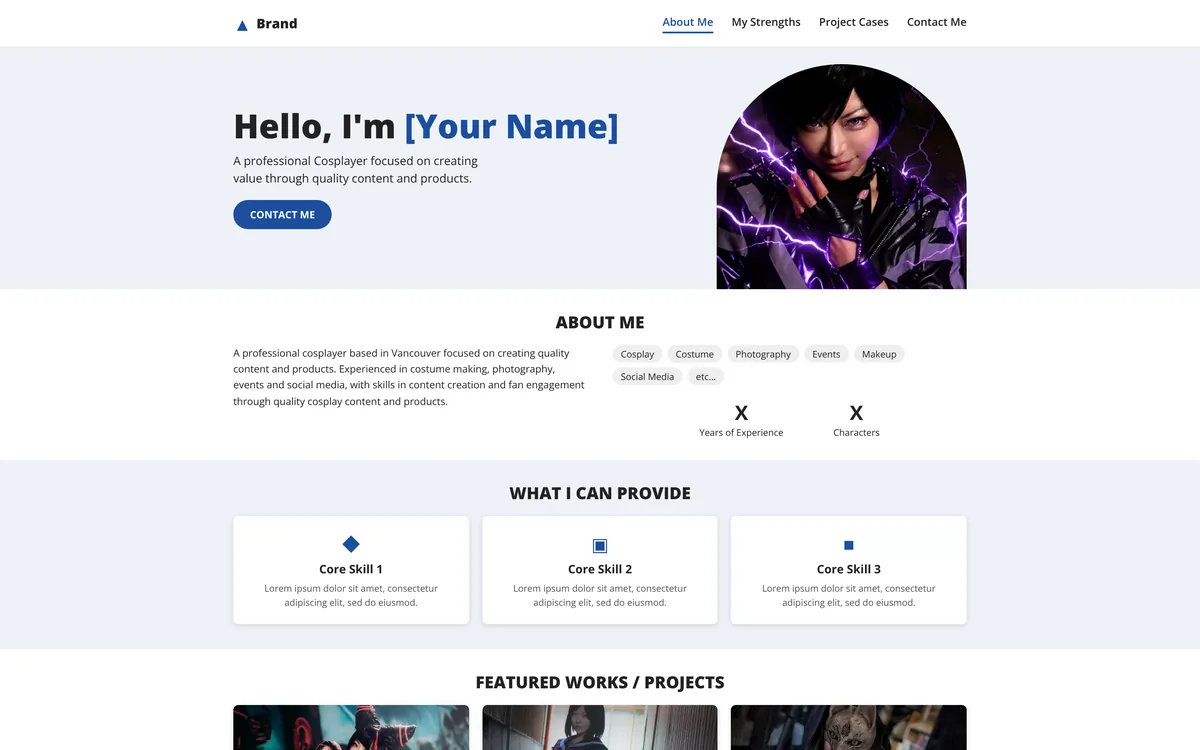
A normal personal brand site, and Yaccosan

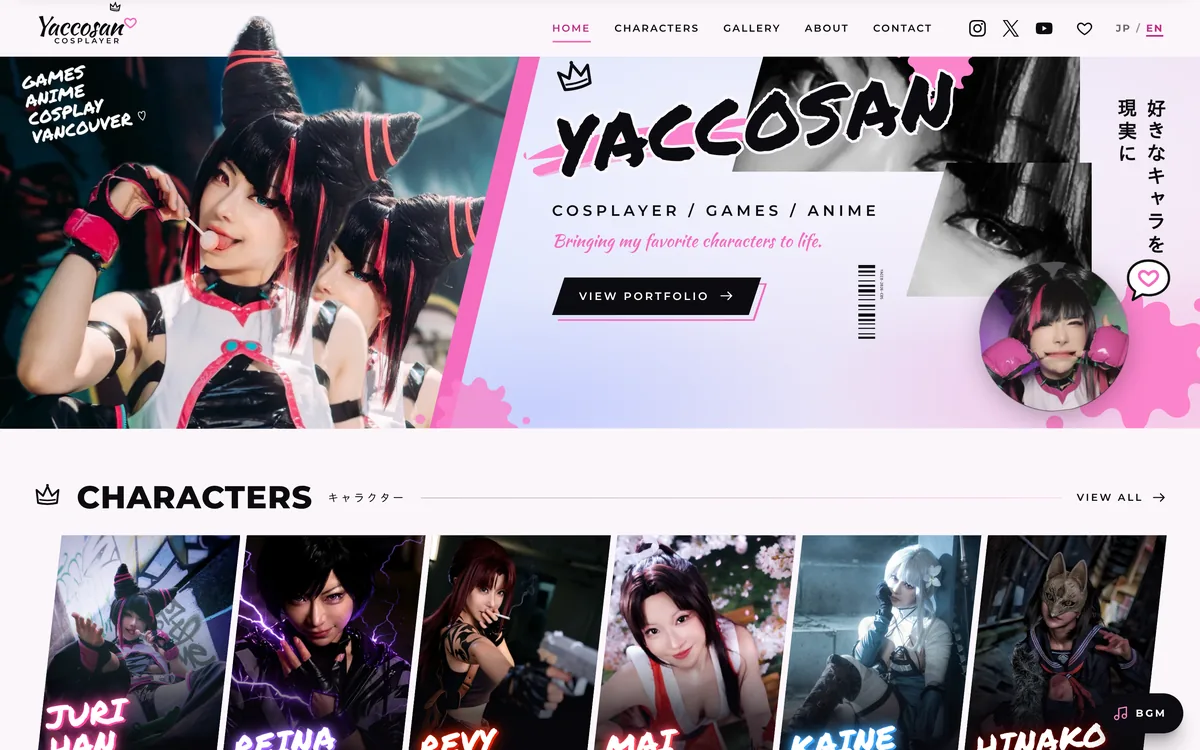
Yaccosan looks nothing like Apple: pink brushstrokes, crowns, characters bursting out of the menu. The rules still hold underneath. That’s the point: you don’t copy Apple, only its rules.

See the project
Yaccosan
A normal personal site
A normal personal siteYaccosan
  1. 1Her look, not Apple’s
  2. 2Clear order: who, then the work
  3. 3Big type, set tight

Right: yaccosan.com.

Install it in 4 steps

You need Claude Code (or Cursor or Codex) and Node.js. It takes about two minutes.

  1. 1

    Open Terminal in your website’s folder

    Open Terminal, type cd and a space, then drag your website’s folder into the window and press Enter.

    On Windows, open the folder, type cmd in the address bar and press Enter.

  2. 2

    Paste the install command

    This downloads the skill into your project. Choose Claude Code when it asks which tools to install to.

    npx skills add emilkowalski/skills --skill apple-design
  3. 3

    Open Claude Code and check it’s there

    Type claude to start it, then /apple-design. If it answers like this, the skill is ready.

  4. 4

    Paste the audit prompt

    Copy the prompt below. Claude goes through the whole site, lists what looks or feels cheap, worst first, and fixes it one step at a time.

The audit prompt

Copy it as it is. The third rule matters most: you want Apple’s rules on your brand, not a copy of Apple.

Use the apple-design skill to audit this whole website.

1. Go through every page and list what makes it look or feel cheap, worst first: spacing, type, colour, buttons, motion, and how it works on a phone.
2. Fix them one at a time, starting with the worst.
3. Keep my brand: my colours, my logo, my photos. Don't copy Apple's look.
4. Ask me before any big change to the layout or the words.

What’s in the rule book

The skill is built from Apple’s WWDC design talks, translated for the web. Five of its ideas, which you can try right here:

Answer the finger

A button reacts the moment it’s pressed, not when it’s let go: it sinks to 97%.

Move like a spring

Things travel on springs, not timers, so they settle like real objects.

Tighten big type

Letters drift apart as they grow, so large headlines are set tighter.

Same spacingPremiumTightenedPremium

Glass shows depth

A translucent menu tells you there’s more page underneath it.

Menu

Eight principles

The names Apple reasons with, which the skill checks your site against.

1Purpose2Agency3Responsibility4Familiarity5Flexibility6Simplicity7Craft8Delight

Designing Fluid Interfaces, WWDC 2018 · The Details of UI Typography, WWDC 2020

3 tips

1

Fix one thing at a time

Let it fix the worst problem, look, then move on. Twenty changes at once are hard to judge.

2

Check on your phone

Most of your customers will see the site there first. Open it on your own phone after each fix.

3

Say what feels off

“The buttons feel dead” or “it’s too crowded” helps it far more than “make it premium”.

What the skill can’t do

It fixes how the site looks and feels, perhaps 70% of a good website. The other 30% decides whether it brings you customers:

  • Words that make people buy, in your customers’ own language
  • A way to order or book: WhatsApp, payments, a booking calendar
  • An admin page, so you can change prices and photos yourself
  • Speed, and showing up on Google

That 30% is the part we do.

Want the whole website done?

Elephant Tech builds websites that come with their own admin panel. You change the prices, photos and text yourself, and there are no monthly fees.

More free skills on Instagram: @tech.elephant

让 AI 做出 Apple 级别的设计。

你叫 Claude 把网站弄得更 premium,它根本不知道你在说什么,只能靠猜。这个免费的 skill 直接把 Apple 设计背后的规则交给它,还能改善你现在已经有的网站。

npx skills add emilkowalski/skills --skill apple-design

✓ apple-design 安装完成

SKILL.mdapple-design · 290 行
name: apple-designdescription: Apple's approach to interface  design and fluid, physical motion,  translated for the web.

里面有什么

立刻回应手指像弹簧一样移动大字要收紧毛玻璃代表层次八个原则

来自 Apple 的 WWDC 设计讲座 · 作者 Emil Kowalski · 免费,MIT 授权

为什么“弄得 premium 一点”永远没用

“Premium”不是一个指令,而是一种感觉,Claude 也看不到你眼中的画面。所以它只能猜:这里加个渐变,那里把按钮弄大,再换个花俏的字体。一个小时后,页面变了,但没有变好,你也说不出问题在哪里。

Apple 的设计看起来高级,是因为背后有规则:按钮多快回应你的手指、字越大字距越紧、每样东西周围留多少空间。这个 skill 把这些规则交给 Claude,它就不用再猜,而是一条一条检查。

同样的照片,不同的规则

我们做的两个网站,放在同行一般网站的旁边。两边用的是一样的照片,所以你看到的差别全部来自设计。拖动来比较。

普通花店网站,和 Yolove Florist

左边是常见的做法:轮播横幅、粉色方块里的全大写字、SALE 标签,还有四种不同的字。右边是我们帮槟城花店做的 Yolove Florist,用的就是这个 skill 教的规则。连照片都会跟着手指滑,滑到尽头像橡皮筋一样弹回。

看这个作品
Yolove Florist
普通花店网站
普通花店网站Yolove Florist
  1. 1一张大照片,不是轮播横幅
  2. 2一个真正的标题,只用一种衬线字
  3. 3一个动作:Shop flowers
  4. 4WhatsApp 一按就到

左:为这篇教学用 Yolove 自己的照片做的示范页面。右:yoloveflorist.com。

普通个人品牌网站,和 Yaccosan

Yaccosan 看起来完全不像 Apple:粉色笔刷、皇冠、冲出菜单栏的角色。但底下的规则一样成立。重点就在这里:你不用抄 Apple,只需要它的规则。

看这个作品
Yaccosan
普通个人网站
普通个人网站Yaccosan
  1. 1她的风格,不是 Apple 的
  2. 2顺序清楚:先人,后作品
  3. 3大字,字距收紧

右:yaccosan.com。

4 步安装好

你需要 Claude Code(或 Cursor、Codex)和 Node.js。大约两分钟。

  1. 1

    在网站文件夹打开终端

    打开 Terminal(终端),输入 cd 加一个空格,再把网站的文件夹拖进窗口,按 Enter。

    Windows:打开文件夹,在地址栏输入 cmd,按 Enter。

  2. 2

    贴上安装命令

    这会把 skill 下载到你的项目里。问你要装到哪个工具时,选 Claude Code。

    npx skills add emilkowalski/skills --skill apple-design
  3. 3

    打开 Claude Code,确认装好了

    输入 claude 启动,再输入 /apple-design。它这样回答,就代表装好了。

  4. 4

    贴上检查用的 prompt

    复制下面的 prompt。Claude 会检查整个网站,把看起来廉价、用起来不顺的地方列出来,最严重的排前面,然后一步一步修。

检查用的 prompt

照原样复制就好。第 3 条最重要:你要的是把 Apple 的规则用在你的品牌上,不是变成 Apple。

用 apple-design 这个 skill,检查我整个网站。

1. 逐页列出让网站看起来廉价、用起来不顺的地方,最严重的排前面:间距、字体、颜色、按钮、动画,还有手机上的表现。
2. 从最严重的开始,一个一个修好。
3. 保留我的品牌:我的颜色、logo 和照片。不要抄 Apple 的样子。
4. 改动版面或文字之前,先问我。

规则书里有什么

这个 skill 整理自 Apple 的 WWDC 设计讲座,再转换成网页用的做法。这里挑五个,你可以直接在这里试:

立刻回应手指

按钮在按下的那一刻就有反应,而不是放开才有:轻轻缩到 97%。

像弹簧一样移动

东西靠弹簧移动,不是靠计时,所以停下来的感觉像真的物体。

大字要收紧

字越大,字母之间看起来越松,所以大标题的字距要收紧。

字距不变Premium收紧之后Premium

毛玻璃代表层次

半透明的菜单,告诉你下面还有内容。

菜单

八个原则

Apple 做设计时用的八个原则,skill 会拿你的网站逐一对照。

1目的2掌控3责任4熟悉5弹性6简单7工艺8愉悦

Designing Fluid Interfaces,WWDC 2018 · The Details of UI Typography,WWDC 2020

3 个小技巧

1

一次只修一个

让它先修最严重的问题,你看过再继续。一次改二十个地方,很难判断好不好。

2

用手机检查

大部分客户都是先在手机上看到你的网站。每修一次,就用自己的手机打开看看。

3

说出哪里怪

“按钮按起来没感觉”“太挤了”,比“弄得 premium 一点”有用得多。

这个 skill 做不到的事

它能修好网站的外观和手感,大概是一个好网站的 70%。剩下的 30%,才决定它能不能帮你带来客户:

  • 让人愿意买的文案,用客户听得懂的话
  • 下单或预约的方法:WhatsApp、线上付款、预约日历
  • 后台管理,让你自己改价钱和照片
  • 速度,还有在 Google 上找得到你

这 30%,就是我们在做的事。

想要整个网站帮你做好?

Elephant Tech 做的网站都附带自己的后台:价钱、照片和文字你都能自己改,而且没有月费。

更多免费 skill,在 Instagram 上: @tech.elephant